Skip to content

From product audit to approved draft

AI-powered product SEO for Shopify.

Audit product listings and draft product descriptions, meta tags, and image alt text with AI. Review every change before publishing.Audit listings. Draft descriptions, meta tags and alt text with AI. Review before publishing.

  • You approve every change
  • Originals always preserved
  • No customer data accessed
Product SEO workspaceExample
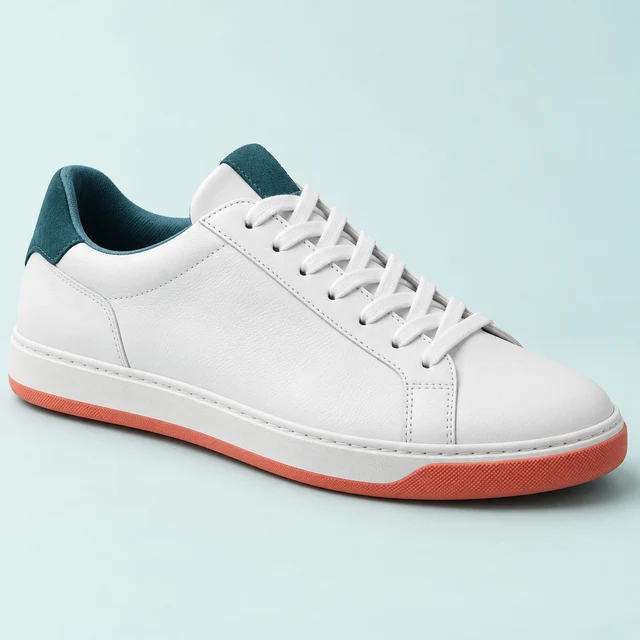
Example white leather sneaker with teal accents and a coral sole

Example Store / Products

Everyday Leather Sneaker

Find the gaps before you write

  • Missing Meta description Ready to draft
  • Missing Image alt text Ready to draft
  • Improve Product title Needs clarity

Product SEO audit based on listing checks. Not a ranking prediction.

Draft first. Publish only when you’re ready.
Interactive example. No live store data or AI requests.

A product SEO audit with a clear next step

Every product gets five scores: overall, content, technical, structured data and AI search readiness. Each check says how well-established it is, from documented requirements to AI search hypotheses, and fixes are sorted by impact. Audits run after each sync and never use credits.

Product content

3 findings, highest impact first

  • WarningTitle duplicates another product−8 pts

    Why it matters. Two products with the same title compete with each other and confuse shoppers.

    Suggested fix. Add the detail that sets this one apart, such as capacity or colour.

    Draft with AI, then review
  • WarningDescription is short (74 words)−7 pts

    Why it matters. Shoppers and search engines get little to go on: capacity, materials and fit aren’t described.

    Suggested fix. Draft a fuller description from the product’s own details, then review it.

    Draft with AI, then review
  • WarningTitle is too long (82 characters)−5 pts

    Why it matters. Long titles get cut off in search results and are harder to read in collection grids.

    Suggested fix. Keep the essentials: “Canvas Commuter Backpack – 20 L, Water-Resistant”.

    Draft with AI, then review

Follow one listing from first audit to ready to publish

Scroll through a single example product as OptiRank audits it, drafts better content and gets it ready to publish. The scores are illustrative: they measure listing quality, not search ranking.

  1. Audit the product

    OptiRank checks the listing against documented rules: title length, description depth, meta tags, image ALT text, keywords and product details. Each finding shows how much it costs the score and why it matters.

    Example score 48 of 100 with 9 findings, including a thin description and a meta description that isn’t set.

  2. Draft a better title and meta description

    AI drafts a clear title and a meta description written only from facts already in your listing. Until a meta title is set, Shopify uses the product title, so the search preview changes too.

    Example score rises to 65. The title and meta description are rewritten; 7 findings remain.

  3. Enrich the description and images

    A fuller description covers materials, fit and sizing from your own product data. Missing ALT text is written for every image, AI suggests attributes and a short summary from the same facts, and you set the product type in Shopify.

    Example score rises to 79. Description, ALT text and product type are fixed; 5 findings remain.

  4. Review, publish and keep the original

    A meta title with the main keyword and a few tags finish the listing. Approve the drafts you want and OptiRank writes them to Shopify; the original text stays in History if you ever want it back.

    Example score reaches 92. Two findings remain: the description could be longer, and two images are below 800 px.

Product descriptions, grounded in your facts

AI drafts titles, meta descriptions, product descriptions and ALT text from the details already in your listing. The image alt text generator uses the product details you provide. Review every draft for accuracy; nothing is published until you approve it.

  • Leather upper
  • Rubber outsole
  • Teal details
  • Coral sole
  • Sizes 6–12
  • Everyday comfort

Every fact in the draft comes from the original listing.

Before

sneaker white/teal

18 characters(aim for 20–70)

AI draftWaiting for your review

Everyday Leather Sneaker – White with Teal Accents

50 characters(aim for 20–70)

Says what the product is, in words shoppers search for.

Illustrative example product.

From install to better listings in five steps

  1. Connect Shopify

    Install the app. It reads your products and store details, never customers or orders.

  2. Audit products

    Every product is scored after the first sync and again whenever it changes.

  3. Optimize with AI

    Pick the fields to improve. You see the credit cost before anything runs.

  4. Review and publish

    Edit or discard drafts, then publish only what you approve.

  5. Track changes

    Scores update after each sync, and History keeps every original so you can restore it.

Bulk SEO optimization, with review built in

Queue up to 1,000 products in a job, depending on your plan, and keep working while drafts are prepared.

  • See a credit estimate first. Know exactly how many credits a job will use before you start it.
  • Track progress live. Jobs run in the background while you keep working.
  • Retry failed items. Anything that fails is refunded and can be retried individually.
  • Review before publishing. Nothing reaches your storefront until you approve it.

Bulk job: Summer collection

24 products, estimated 72 credits

Example

15 of 24 drafted

  • Everyday Leather SneakerReady for review
  • Canvas Commuter BackpackReady for review
  • Merino Crew Socks (3-pack)Drafting
  • Waxed Cotton CapFailed, credits refunded
  • Linen Weekend ShirtQueued

Start free, upgrade when you need more

Every plan includes a monthly credit allowance for AI work. Audits never use credits. Billed monthly in USD through Shopify; change or cancel any time from the app.

  • Free

    Audit your catalog and try AI on a few products.

    $0forever

    50 credits a month

    Start free
    • SEO audits for every product
    • AI titles, descriptions, meta and ALT text
    • Bulk jobs (not included)
    • Priority processing (not included)
    • Unpublished drafts kept 30 days
  • Starter

    AI SEO content and bulk optimization for growing stores.

    $14.99a month

    600 credits a month

    Choose Starter
    • SEO audits for every product
    • AI titles, descriptions, meta and ALT text
    • Bulk jobs up to 50 products
    • Priority processing (not included)
    • Unpublished drafts kept 90 days
  • Recommended

    Pro

    Larger bulk jobs, priority processing and a full year of history.

    $34.99a month

    2,500 credits a month

    Choose Pro
    • SEO audits for every product
    • AI titles, descriptions, meta and ALT text
    • Bulk jobs up to 250 products
    • Priority processing
    • Unpublished drafts kept 365 days
  • Business

    High-volume catalogs and larger bulk jobs.

    $79.99a month

    8,000 credits a month

    Choose Business
    • SEO audits for every product
    • AI titles, descriptions, meta and ALT text
    • Bulk jobs up to 1,000 products
    • Priority processing
    • Unpublished drafts kept 365 days

What a credit buys

Costs follow the work involved, per product (ALT text covers all of a product’s images). You see the estimate before anything runs, and failed operations are refunded automatically.

Billing is handled by Shopify and appears on your Shopify invoice.

SEO content
OperationCredits
Image ALT text1
Product title1
SEO meta title & description1
Keyword suggestions1
Product description2
Full SEO content pack3
Audits and AI search readiness
OperationCredits
SEO auditFree
Product attributes1
AI-friendly summary1

Questions merchants ask

Something else? Email [email protected] or visit the support page.

Can I edit AI-generated content before it's published?

Yes. Everything OptiRank AI writes is saved as a draft. You can review, edit or discard it, and nothing is published to your store until you approve it.

Better content can help shoppers and search engines understand your products, but no tool can guarantee search rankings or sales.

Will the AI invent product details?

OptiRank AI writes from your own Shopify product data: title, description, product type, vendor, tags and existing ALT text. It's instructed not to invent specifications, materials or certifications that aren't in your listing, and it flags claims it can't find there.

AI can still make mistakes, which is why you review every draft before publishing.

Does a higher SEO score mean better Google rankings?

No. The score measures how complete and well-formed a product listing is against documented SEO practices. Rankings depend on many things no app controls, such as competition, demand and your site as a whole.

Use the score to find and fix gaps, not as a ranking prediction.

What does AI search readiness mean?

It describes how easily AI assistants and search engines can understand a product from its listing. OptiRank scores it from checks on your product data and your live store: a clear, factual description with real specifications, the product category and attributes, a short summary, prices, stock, GTINs, product structured data on the page, crawler access in robots.txt and your shipping and refund policies.

Each check is labelled with how well-established it is, from documented search engine requirements to AI search hypotheses, so you can see which fixes are proven and which are reasonable bets.

No tool can decide what ChatGPT, Gemini, Perplexity or any other assistant recommends. OptiRank helps make your product information clear and complete.

Does OptiRank add structured data (schema) to my store?

Yes, if your theme doesn't already. OptiRank checks a sample of your live product pages for Product structured data. If it's missing, you can turn on the OptiRank app embed in your theme editor, which adds Product markup built from your Shopify data: name, images, brand, price, currency, stock, SKU and GTIN, plus any summary and attributes you publish.

Turn it on only when the check shows the markup is missing, so your pages don't carry two copies.

Can I optimize many products at once?

Yes, on paid plans. Bulk jobs let you pick products by score or status, show the credit estimate before you start, and run in the background. Failed items are refunded and can be retried, and every draft waits for your review.

How does it sync with Shopify?

OptiRank AI reads your products through Shopify's official APIs. When you approve a change, it's written back to that product in your store: titles, descriptions, SEO fields or ALT text.

How does billing work?

Billing is handled securely by Shopify and appears on your regular Shopify invoice. Open the Pricing section for plan allowances and the current pricing destination. Paid prices are confirmed in Shopify before you subscribe. You can manage your plan from within the app.

How do credits work?

Each plan includes a monthly allowance of credits that resets every billing period. Each AI task costs 1 to 3 credits per product, audits are free, and you always see the estimate before you start.

If an operation fails, its credits are refunded automatically.

What data does OptiRank AI access, and where is it sent?

OptiRank AI only accesses your store information and product data. It does not access customer or order data.

To generate content, product text is sent to Google Gemini. See our Privacy Policy for details.

What happens if I uninstall?

Your OptiRank AI data (drafts, audit results and usage records) is deleted about 48 hours after uninstalling, when Shopify sends its shop data removal request. Changes you already published remain in your store.

Questions? Email us at [email protected].

Audit your catalog today. It’s free.

Install OptiRank AI, run your first audit in minutes and try AI drafts on a few products with the free plan. Nothing is published until you approve it.